The livt.toml manifest describes a project’s source files, tests, dependencies, and generation settings. This reference explains the supported fields, their value types, and what happens when a setting is omitted. Use Project Configuration for the workflow of editing, building, and testing a project in Visual Studio Code.
Start with the sections your project needs. Vendor configuration is only needed when preparing a vendor integration, and most projects can use the default generator and reset settings. The examples below are manifest sections to adapt to your own components and target hardware.
Understand the project file
TOML groups settings into named tables such as [project] and [tests]. A setting belongs to the most recent table header. Strings use quotation marks, booleans use true or false without quotes, and lists use square brackets. Relative source, test, and local dependency paths are resolved from the project directory containing the manifest.
[project]
name = "ReferenceDemo"
component = "Livt.App.MyComponent"
path = "src"
outdir = "out"

[tests]
path = "tests"
components = ["MyComponentTest"]
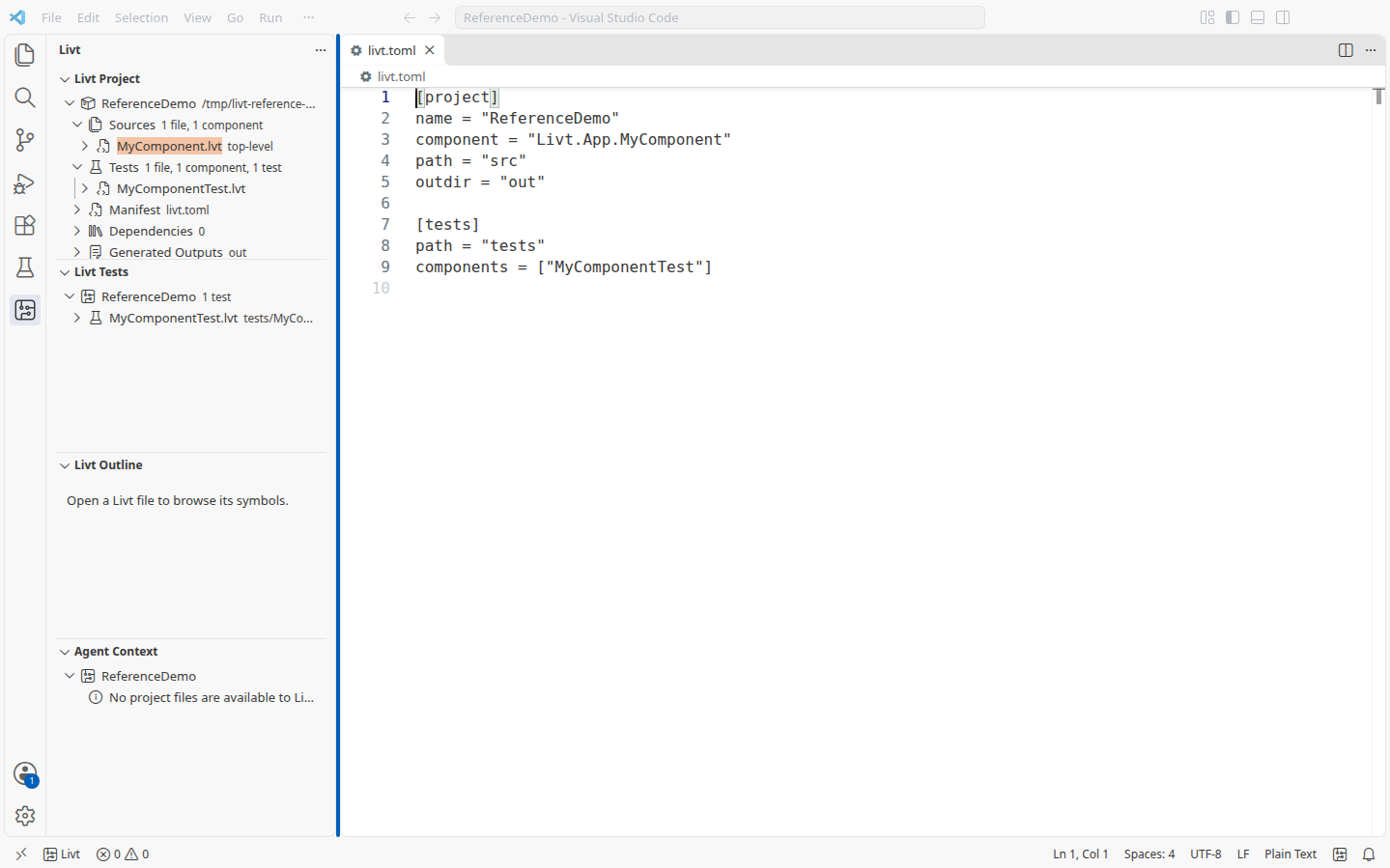
This complete manifest names the project ReferenceDemo, selects Livt.App.MyComponent, and uses src, tests, and out for source, test, and generated files. The component and test names must match declarations in those directories. The Hello World template supplies MyComponent and MyComponentTest; see Hello, Livt! to create that starting point.
Define the project and tests
The project name identifies the project; the component selects the design used where an entry component is required. Keep those roles explicit when the folder name, package name, and component name differ. Use a qualified component name when a short name would be ambiguous.
| Setting | Type | Meaning and omission behaviour |
|---|---|---|
project.name | String | Project identity. No name is supplied when omitted; set it explicitly for a named project. |
project.component | String | Entry component. Falls back to project.name when omitted or blank; it must resolve to the intended component. |
project.version | String | Package version. Unset when omitted; provide a release version before publishing. Vendor IP templates can supply their own fallback version. |
project.path | String | Source directory; defaults to src. |
project.outdir | String | Generated-output root; defaults to out. Profile-specific output lives below this root. Keep authored files elsewhere: cleaning removes this directory. |
project.profile | String | Configured output profile: debug by default, or release. Use the release command option to request release generation; an output profile name alone is not a replacement for that option. |
project.indexUrl | String | Package index URL. Uses the standard Livt package index when omitted. Keep authentication credentials outside this value. |
tests.path | String | Test source directory; defaults to tests. |
tests.components | Array of strings | Test components to select. An omitted or empty list leaves selection to discovery or an explicit test filter. Listed names must be discoverable; use qualified names where needed. |
Source paths select directories, not individual entry files. The tests.components list names components rather than test methods. Use the test runner’s filter when you want one method, as described in CLI Reference.
Declare dependencies
Each entry in [dependencies] maps a package name to a registry version request or a local package directory. Quote dotted package names so the intended key is clear. The following entries illustrate alternatives; replace the version and path placeholders with values your project can resolve.
[dependencies]
"Package.Name" = "<selected-version>"
"Local.Package" = { path = "../local-package" }
"Identified.Local.Package" = { version = "<selected-version>", path = "../identified-package" }| Setting | Type | Meaning and omission behaviour |
|---|---|---|
dependencies."Package.Name" | String or inline table | A string requests a registry version. An inline table accepts version and path. |
version | String | Version request. Without a path, the package is resolved from the registry. A missing version uses the unrestricted request *. |
path | String | Local package directory, resolved from the consuming project. The package is read from local files instead of downloaded from the registry. |
The manifest states the dependency request; livt.lock records the resolved selection. Do not copy downloaded files or lock-file contents into the manifest. A local path still refers to the files currently on disk, so the lock file does not freeze those contents. See Packages and Dependencies for synchronisation and version selection.
Configure build settings
Build configuration has a project-wide reset default and profile-specific warning lists. Keep shared warning choices in the manifest and use command options for an individual run. Debug and release warning settings are separate.
[build]
default_reset_style = "sync"

[build.debug]
warnings = ["all", "no-variable-divisor"]

[build.release]
warnings = ["all", "error"]| Setting | Type | Meaning and omission behaviour |
|---|---|---|
build.default_reset_style | String | sync or async; defaults to sync. Applies to contexts without a more specific reset requirement. A command’s --default-reset-style overrides this default. |
build.debug.warnings | Array of strings | Warning flags for debug runs. Omission adds no manifest warning overrides. |
build.release.warnings | Array of strings | Warning flags for release runs. Omission adds no manifest warning overrides. |
all enables warnings, no-<code> suppresses a named warning, and error makes visible warnings fail the operation. For example, no-variable-divisor suppresses that synthesis diagnostic. The reset default does not override an explicit context requirement or a setting inherited through a context binding.
Optimisation selection and assertion-retention overrides are command options, not additional manifest keys. Use --optimize, --release, and --strip-assertions as described in CLI Reference. See Contexts for reset semantics.
Configure VHDL generation
The [vhdl] table controls the generated file header. Set your company name here instead of editing generated VHDL, which will be replaced by the next generation run.
[vhdl]
file_header = true
company = "Example Engineering"| Setting | Type | Meaning and omission behaviour |
|---|---|---|
vhdl.file_header | Boolean | Include the generated header; defaults to true. Set false to omit it. |
vhdl.company | String | Company name in the generated copyright line. Defaults to Eccelerators GmbH when omitted or blank. |
Generator service settings
The optional [vhdl.api] table belongs to deployments using the web generator service. Ordinary projects can leave it out. These settings control the service connection, not the generated hardware interface.
| Setting | Type | Meaning and omission behaviour |
|---|---|---|
vhdl.api.url | String | Override the generator service base URL. Omission keeps the standard service endpoint. |
vhdl.api.ca | String | Service certificate mode. Omission retains normal server certificate verification. The value private disables that verification; it is not a path to a CA certificate. Leave it unset for normal verified connections. |
Select a vendor configuration
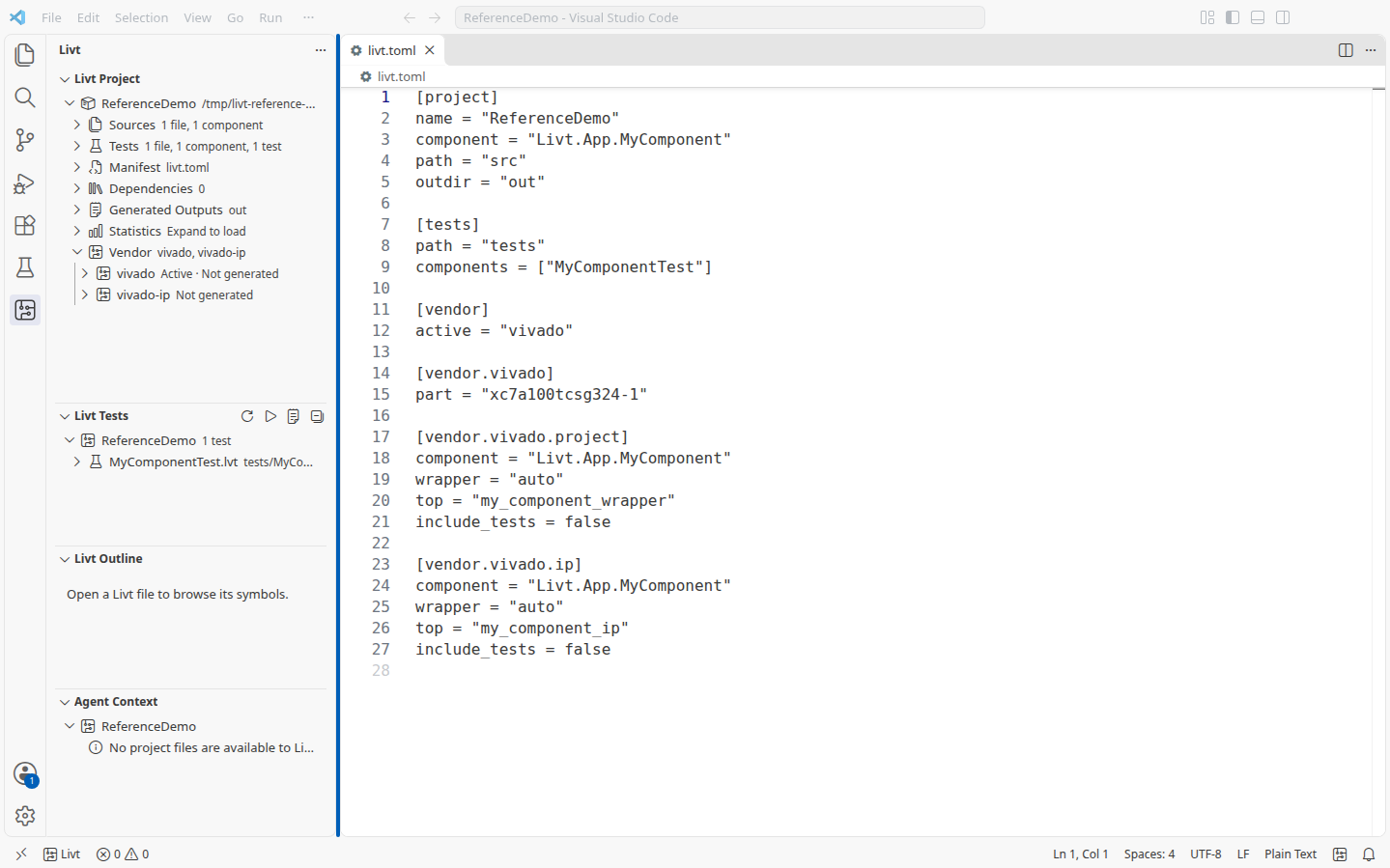
A manifest can retain several vendor configurations. [vendor].active selects the template used for target-specific generation choices, including memory attributes. Selecting one preserves the settings of the others. It does not itself run a vendor tool.
[vendor]
active = "vivado"

[vendor.vivado]
part = "xc7a100tcsg324-1"

[vendor.vivado.project]
component = "Livt.App.MyComponent"
wrapper = "auto"
top = "my_component_wrapper"
include_tests = false

[vendor.vivado.ip]
component = "Livt.App.MyComponent"
wrapper = "auto"
top = "my_component_ip"
include_tests = false
Supported active names are vivado, vivado-ip, gowin, gowin-ip, radiant, and radiant-ip. A single configured template is selected automatically. When several configurations have no unambiguous selection, generation uses default memory attributes and reports a warning.
The paired vendor.target and vendor.toolchain string settings remain supported for target selection. Matching pairs are amd/vivado, gowin/gowin, and lattice/radiant. Prefer active for an explicit template choice; it takes precedence. Configure the pair together when using it.
Shared template fields
Every vendor’s .project and .ip table accepts the following fields. These are per-template choices: selecting a component for a standalone project does not set the component of a separately configured IP template.
| Setting | Type | Meaning and omission behaviour |
|---|---|---|
component | String | Component to export. Falls back to the project component; a unique generated component can be selected when no name is available. Ambiguous or unresolved names need an explicit selection. |
wrapper | String | auto by default, or the path of an authored VHDL wrapper relative to the project. |
top | String | Top-level VHDL entity. Derived from the component when omitted: Vivado uses a normalised name with _wrapper; GOWIN and Radiant use _wrapper for projects and _ip for IP. Set it to the actual entity when using a custom wrapper. |
include_tests | Boolean | Include test output in the integration file set. Defaults to true for Vivado and false for GOWIN and Radiant. Inclusion does not run the tests. |
Templates can write missing defaults when they are prepared. Review the resulting manifest, especially the device, wrapper, and test inclusion. Executable paths are optional: prefer machine-specific environment settings or PATH where possible. See Hardware Integration for tool resolution and the generation workflow.
Look up vendor settings
The following tables describe vendor-specific fields in addition to the shared fields above. Target defaults are starting points, not a board selection: configure the exact device and constraints required by your hardware. Version values in examples are placeholders to replace before packaging.
Vivado
[vendor.vivado] supplies settings shared by the standalone and IP templates. [vendor.vivado.project] uses the shared template fields. [vendor.vivado.ip] also describes the IP-XACT package identity and catalogue presentation.
| Setting | Type | Meaning and omission behaviour |
|---|---|---|
vendor.vivado.path | String | Vivado executable path. When omitted, tool resolution checks the environment and PATH. |
vendor.vivado.part | String | Target FPGA part; template default xc7z020clg400-1. |
vendor.vivado.ip.vendor | String | IP vendor identifier; defaults to eccelerators.com. |
vendor.vivado.ip.library | String | IP library; defaults to user. |
vendor.vivado.ip.name | String | IP name; defaults to the lower-case project name, with the top name as fallback. |
vendor.vivado.ip.version | String | IP version; uses the project version when present, otherwise the template’s fallback version. Set it explicitly for a release. |
vendor.vivado.ip.display_name | String | Catalogue display name; derived from the project or component. |
vendor.vivado.ip.description | String | Catalogue description; defaults to a generated-project description. |
vendor.vivado.ip.taxonomy | String | Catalogue category; defaults to /UserIP. |
[vendor.vivado.ip]
component = "Livt.App.MyComponent"
wrapper = "auto"
top = "my_component_ip"
vendor = "example.com"
library = "devices"
name = "my_component"
version = "<release-version>"
display_name = "My Component"
include_tests = false
GOWIN
The standalone GOWIN template uses the part and device revision together. Configure both when changing the target. Its project table can load physical and timing constraints, while the IP table describes a portable VHDL bundle.
| Setting | Type | Meaning and omission behaviour |
|---|---|---|
vendor.gowin.path | String | GOWIN executable path; environment and PATH are used when omitted. |
vendor.gowin.part | String | Target part; defaults to GW1NR-LV9QN88PC6/I5. |
vendor.gowin.device_version | String | Device revision. Defaults to C for the default part; other parts require an explicit revision. |
vendor.gowin.project.constraints | Array of strings | Physical constraint file paths; empty by default. |
vendor.gowin.project.timing_constraints | Array of strings | Timing constraint file paths; empty by default. |
vendor.gowin.project.output_base_name | String | Base name for generated tool outputs; derived from the project name. |
vendor.gowin.project.run | String | Tool run stage; defaults to all. Use a stage supported by the selected tool. |
vendor.gowin.ip.name | String | Bundle name; derived from the project name. |
vendor.gowin.ip.version | String | Bundle version; uses the project version or a template fallback. Set explicitly for a release. |
vendor.gowin.ip.library | String | VHDL library; defaults to work. |
[vendor.gowin]
part = "GW1NR-LV9QN88PC6/I5"
device_version = "C"

[vendor.gowin.project]
component = "Livt.App.MyComponent"
wrapper = "auto"
constraints = ["constraints/board.cst"]
timing_constraints = ["constraints/board.sdc"]
include_tests = false
The constraint paths in this example must point to files you supply for the board. For an IP bundle, use [vendor.gowin.ip] with the shared component, wrapper, top, and test settings, then add the name, version, and library you want consumers to use.
Lattice Radiant
Radiant separates device settings, implementation settings, and IP packaging metadata. Use [vendor.radiant.project] for the implementation flow and [vendor.radiant.ip] for the installable package.
| Setting | Type | Meaning and omission behaviour |
|---|---|---|
vendor.radiant.path | String | Radiant executable path; resolved from the environment and PATH when omitted. |
vendor.radiant.ip_packager_path | String | IP packager executable override; otherwise use tool discovery. |
vendor.radiant.device | String | Target device; defaults to LFD2NX-40-8BG256C. |
vendor.radiant.performance | String | Device performance grade; defaults to "8". |
vendor.radiant.project.implementation | String | Implementation name; defaults to impl_1. |
vendor.radiant.project.strategy | String | Strategy name; defaults to Strategy1. |
vendor.radiant.project.synthesis | String | Synthesis engine; defaults to lse. |
vendor.radiant.project.constraints | Array of strings | Constraint file paths; empty by default. |
vendor.radiant.project.run_to | String | Last tool stage to run; defaults to export. |
vendor.radiant.ip.vendor | String | Package vendor; defaults to eccelerators.com. |
vendor.radiant.ip.library | String | Package library; defaults to livt. |
vendor.radiant.ip.name | String | Package name; derived from the project name. |
vendor.radiant.ip.version | String | Package version; uses the project version or a template fallback. Set explicitly for a release. |
vendor.radiant.ip.display_name | String | Display name; derived from the project or component. |
vendor.radiant.ip.description | String | Package description; defaults to a generated-project description. |
vendor.radiant.ip.supported_devices | Array of strings | Supported device identifiers in the package metadata; empty by default. |
vendor.radiant.ip.documentation | String | Optional documentation file path; empty by default, which uses generated documentation. |
vendor.radiant.ip.encrypt | Boolean | Request encrypted IP packaging; defaults to false. |
[vendor.radiant]
device = "LFD2NX-40-8BG256C"
performance = "8"

[vendor.radiant.project]
component = "Livt.App.MyComponent"
wrapper = "auto"
implementation = "impl_1"
synthesis = "lse"
run_to = "export"
include_tests = false
For an IP package, place the shared settings and package metadata under [vendor.radiant.ip]. Declaring supported devices describes the package; it does not establish that the design meets timing or resource requirements on each device. Verify the generated integration with the target tool.
Validate the manifest
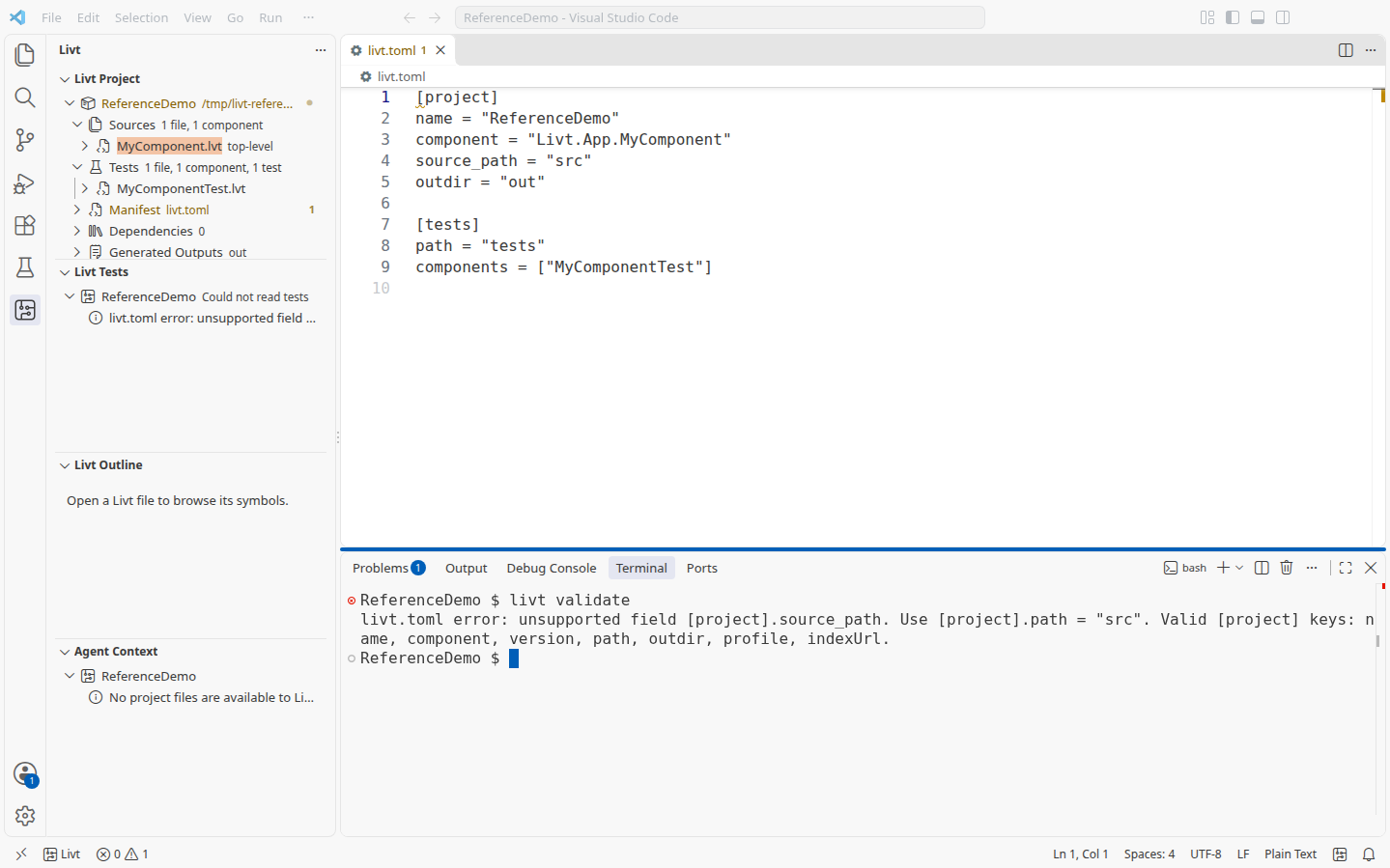
Save livt.toml and check the Livt Project view and diagnostics before building. Use Validate Livt Project in VS Code or livt validate in its terminal. Unsupported fields in recognised tables, malformed dependency declarations, and missing source directories need correction before the intended project can be used reliably.
The example below uses source_path, which is not a supported project field. The diagnostic identifies the table and field and suggests path. Change it to path = "src", save, and validate again.
Check value types as well as spelling: components and warnings are arrays of strings, while file_header and include_tests are booleans. After fixing the manifest, confirm that source roots exist and listed test components are discovered. A syntactically valid manifest cannot make a missing file or an unknown component available.
Keep machine settings separate
Commit the settings that describe the shared project. Keep credentials, downloaded dependencies, and generated output outside the manifest. The configured output directory is a valid project setting; the generated files themselves are not manifest content. Use the VS Code installation manager, environment variables, or PATH for Java, simulator, and vendor-tool installations. In particular, do not add a simulator table to livt.toml.
Continue with Project Configuration for the editing workflow, CLI Reference for invocation overrides, or Hardware Integration for generating and checking a vendor project.